DITO Roaming Services
Planning to travel abroad? Staying connected is essential for navigation, messaging, banking, work, and keeping in touch with family. If you’re a DITO subscriber, activating DITO Roaming before or during your trip lets you continue using mobile data, calls, and SMS in supported countries.
This guide explains how to activate DITO Roaming, available roaming bundles, supported destinations, pricing, and helpful travel tips to ensure a smooth connection overseas.
Related – How to Register a TNT SIM for Minors
Quick Answer: How Do You Activate DITO Roaming?
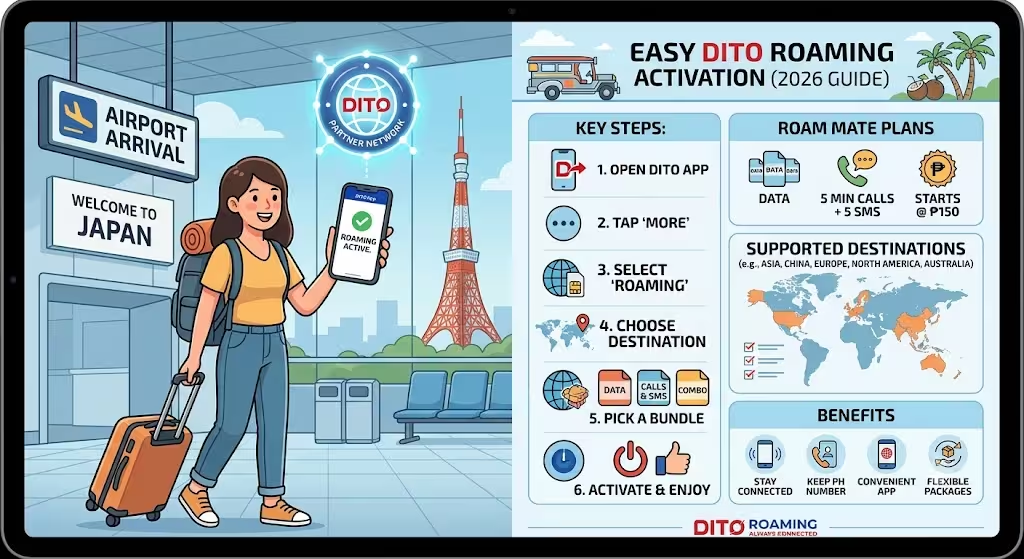
You can activate DITO Roaming directly through the official DITO App by following these steps:
- Open the DITO App.
- Tap More from the dashboard.
- Select DITO Roaming.
- Choose your destination country.
- Select your preferred Roam Mate bundle.
- Tap Activate or Buy.
- Wait for the confirmation SMS and in-app notification before using roaming services.
This process only takes a few minutes and is the easiest way to enable international roaming.
Step-by-Step Guide to Activate DITO Roaming
Step 1: Launch the DITO App
Open the latest version of the DITO App on your smartphone and sign in to your account if necessary.
Step 2: Access the Services Menu
From the main dashboard, tap More to open additional account services.
Step 3: Select DITO Roaming
Look for the DITO Roaming icon and tap it to access international roaming options.
Step 4: Choose Your Destination
Select the country where you’ll be traveling. Available roaming bundles vary depending on the destination.
Step 5: Pick a Roam Mate Bundle
Choose the roaming package that best matches your travel needs. Options may include:
- Mobile data bundles
- Call and SMS bundles
- Combined roaming packages where available
After selecting a package, tap Buy or Activate.
Step 6: Confirm Activation
Once the purchase is complete, you’ll receive:
- SMS confirmation
- In-app notification confirming successful activation
After arriving at your destination, your phone should connect automatically to a supported partner network.
DITO Roaming Plans and Pricing
DITO offers Roam Mate bundles designed for different travel needs.
| Feature | Details |
|---|---|
| Starting Price | ₱150 |
| Validity | Typically 3 days (varies by bundle) |
| Services | Mobile Data, Calls, SMS |
| Entry-Level Bundle | Data or 5 minutes of calls plus 5 SMS (depending on destination) |
| Activation | Through the DITO App |
Always review the latest package details before purchasing, as prices, inclusions, and validity periods may change.
Countries Supported by DITO Roaming
DITO Roaming is available in many international destinations through partner mobile operators.
Coverage includes major travel destinations across:
- Asia
- China
- Selected countries in Europe
- North America
- Australia
- Other international partner networks
Before traveling, check whether your destination is included in the latest list of supported roaming countries in the DITO App or on the official DITO website.
Benefits of Using DITO Roaming
Activating roaming before your trip provides several advantages.
Stay Connected Immediately
Your mobile service works shortly after arriving without searching for a local SIM card.
Keep Your Philippine Number
Receive important OTPs, banking alerts, and calls using your existing number.
Convenient Activation
Everything is managed directly inside the DITO App without visiting a physical store.
Flexible Travel Packages
Roam Mate bundles let you choose options based on your destination, budget, and expected usage.
Tips Before Activating DITO Roaming
To avoid connectivity issues during your trip:
- Update the DITO App before departure.
- Activate your roaming bundle before boarding your flight when possible.
- Ensure your phone’s data roaming setting is enabled.
- Confirm your destination is supported.
- Monitor your roaming balance through the DITO App.
- Purchase a bundle that matches the length of your trip.
Common DITO Roaming Issues and Solutions
Roaming Is Not Working
Try the following:
- Restart your phone.
- Enable Data Roaming in your device settings.
- Select a supported network manually.
- Confirm your roaming bundle is active.
No Confirmation Received
Check your internet connection and reopen the DITO App. If the bundle was not activated successfully, try purchasing again or contact DITO Customer Support.
Unable to Connect to a Partner Network
Move to another area with stronger signal coverage or manually switch to another supported roaming partner if available.
Common Mistakes to Avoid
Many travelers experience unnecessary issues because of simple oversights.
Avoid these mistakes:
- Waiting until after arrival to activate roaming.
- Purchasing the wrong destination bundle.
- Forgetting to enable data roaming.
- Assuming every country has identical roaming rates.
- Ignoring bundle validity periods.
Expert Recommendations
Before leaving the Philippines, verify that your preferred Roam Mate package is active and that your phone can connect to partner networks. If you’ll be relying on mobile data for maps, messaging, or work, select a bundle that provides sufficient data for your expected usage rather than the lowest-priced option.
Frequently Asked Questions
Final Thoughts
Activating DITO Roaming is a straightforward process that helps you stay connected wherever your travels take you. Using the DITO App, you can enable roaming, select the right Roam Mate bundle, and receive confirmation within minutes. Planning ahead and choosing the appropriate package can help you avoid connectivity issues and unexpected costs while abroad.
For the latest roaming destinations, pricing, and bundle availability, refer to the official DITO website and the DITO App before your trip.