DITO SIM registration – Register Your Dito Sim 2026 (Step by Step)
What Is DITO SIM Registration?
DITO SIM registration is the mandatory process of linking your DITO SIM card to your verified personal identity. During registration, subscribers must provide their personal information, upload a valid government-issued ID, and complete identity verification through DITO’s official registration portal or mobile app. Once the registration is successfully completed, the SIM card can be activated and used for calls, texts, and mobile data.
The registration process is implemented in compliance with Philippine law and applies to both prepaid and postpaid DITO subscribers. It helps create a secure telecommunications environment while ensuring that every active SIM card is associated with a legitimate user.
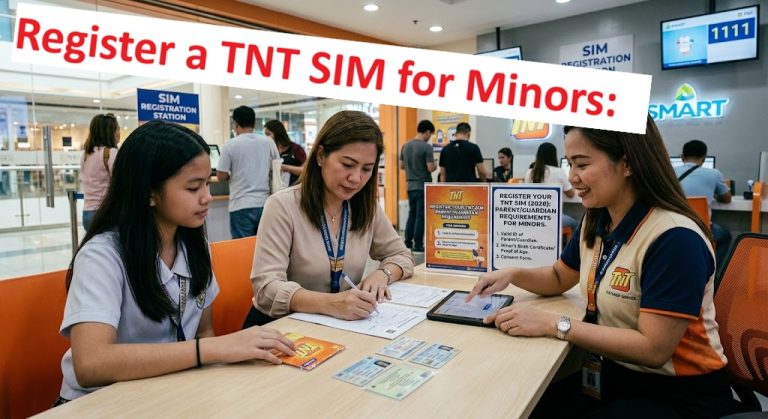
Related – How to Register a TNT SIM for Minors
Why DITO SIM Registration Is Required
DITO SIM registration is required to comply with the Philippines’ SIM Registration Act. The law requires all telecommunications providers to verify the identity of their subscribers before activating or continuing the use of a SIM card.
The primary purpose of mandatory registration is to reduce criminal activities that rely on anonymous mobile numbers, including text scams, phishing attacks, identity theft, fraud, and other cybercrimes. By maintaining an accurate subscriber database, authorities can investigate illegal activities more effectively while protecting legitimate mobile users. Failure to register a SIM may result in its deactivation under applicable regulations.
Read more: Tnt Sim Registration
SIM Registration Act in the Philippines
The SIM Registration Act, officially known as Republic Act No. 11934, is a Philippine law that requires all SIM cards—both prepaid and postpaid—to be registered with their respective telecommunications providers. The law took effect in late 2022, with implementing rules issued by the National Telecommunications Commission (NTC).
Under this legislation, mobile users must provide accurate personal information and present valid identification documents during registration. The law covers Filipino citizens, businesses, foreign nationals, tourists, and other eligible SIM users. Its goal is to strengthen cybersecurity, improve consumer protection, and discourage the misuse of mobile communication services.
More Sim Registration Guides: Smart Sim Registration
Benefits of Registering Your DITO SIM
Registering your DITO SIM offers several important advantages beyond legal compliance.
- Ensures uninterrupted access to calls, text messaging, and mobile data services.
- Protects your mobile number from deactivation due to non-compliance.
- Helps reduce spam messages, scams, and fraudulent activities.
- Makes account recovery easier if your SIM card is lost or stolen.
- Improves security by linking the SIM card to a verified identity.
- Allows subscribers to enjoy DITO services with confidence while complying with Philippine regulations.
Who Needs to Register a DITO SIM?
The SIM Registration Act requires nearly all DITO subscribers to complete SIM registration. The exact requirements may vary depending on the subscriber category.
New DITO SIM Users
Anyone purchasing a new DITO SIM card must complete registration before the SIM can be activated. New users are required to provide personal details, upload a valid ID, complete identity verification, and submit the registration through DITO’s official channels.
Existing DITO Subscribers
Existing DITO customers are also required to ensure their SIM cards are properly registered. If subscriber information requires confirmation or updating, DITO may prompt users through its app or official registration platform. Registered subscribers can continue using their services without interruption.
DITO Prepaid Users
All prepaid DITO SIM users must register their SIM cards using their personal information and an accepted government-issued ID. Registration is mandatory before a new prepaid SIM can be activated and is required for continued service under Philippine regulations.
DITO Postpaid Users
DITO postpaid subscribers are likewise covered by the SIM Registration Act. In many cases, existing customer information already submitted during account application may only need confirmation or verification through DITO’s registration process.
Business or Corporate SIM Registration
Companies and organizations using DITO corporate SIM cards must also complete registration. In addition to the authorized representative’s identification, businesses may be required to submit documents such as SEC or DTI registration certificates and authorization documents identifying the representative authorized to register the SIM cards.
Foreign Nationals and Tourists
Foreign nationals staying in the Philippines can register DITO SIM cards by presenting the required travel and identification documents. Tourists generally need a valid passport, proof of local address, and a return or onward ticket, while foreign residents may need additional immigration or visa-related documents depending on their status.
Minors Registering a DITO SIM
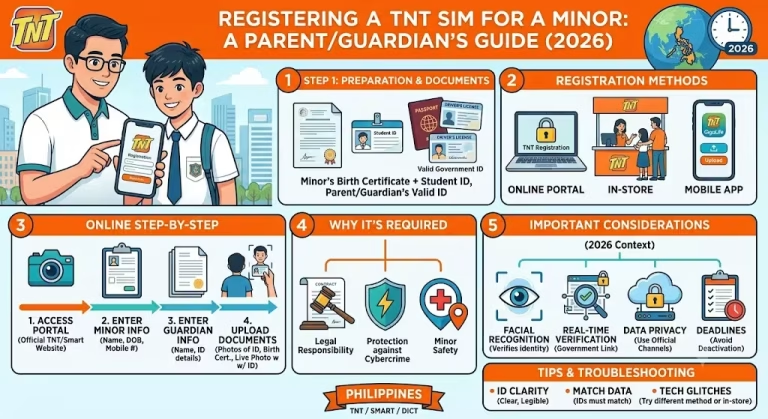
Minors are permitted to use DITO SIM cards, but the registration must be completed under the name of their parent or legal guardian. The parent or guardian must provide a valid government-issued ID and give consent for the SIM registration in accordance with DITO’s requirements and the SIM Registration Act.
Read more: TNT SIM Registration for OFWs
DITO SIM Registration Requirements
To successfully register your DITO SIM, you must provide accurate personal information and submit valid identification documents. The exact requirements may vary depending on whether you are a Filipino citizen, a foreign national, or registering on behalf of a business. Preparing the necessary documents in advance helps ensure a faster and smoother registration process.
Providing false information or fake documents may result in registration failure or possible legal consequences under the SIM Registration Act.
Valid Government IDs Accepted
DITO accepts a wide range of government-issued identification cards for SIM registration. These IDs are used to verify your identity and ensure that the SIM card is registered to its rightful owner.
Your ID should be valid, clearly readable, and contain your full name, photograph, and other identifying information. Expired, damaged, or blurred IDs may not be accepted during verification.
Proof of Identity Requirements
Every applicant must prove their identity during the registration process. This usually involves submitting personal details exactly as they appear on the selected ID and uploading a clear image of the document.
In some cases, DITO may also require a selfie or facial verification to confirm that the person registering the SIM matches the identification provided. This additional verification helps prevent identity theft and fraudulent registrations.
Proof of Address (If Required)
Most Filipino subscribers are not required to submit proof of address during standard SIM registration. However, certain situations—such as registrations by foreign nationals or additional verification requests—may require supporting documents that confirm your current address.
Acceptable proof of address may include utility bills, lease agreements, bank statements, or other official documents showing your name and residential address.
Age Eligibility for Registration
There is no strict minimum age for owning a DITO SIM. However, minors cannot independently complete the registration process.
If the SIM card will be used by a child below the legal age, the registration must be completed by a parent or legal guardian. The guardian’s identification and consent are required, and they assume responsibility for the registered SIM.
Requirements for Foreign Nationals
Foreign nationals can register a DITO SIM by providing valid immigration and identification documents. The required documents may differ depending on whether the individual is a tourist, a temporary visitor, or a long-term resident.
Typically, applicants should prepare:
- A valid passport
- A valid visa or immigration document (if applicable)
- Proof of local address, when required
- Return or onward travel ticket for tourists
- Other documents requested by DITO or Philippine authorities
Foreign subscribers should ensure that all documents remain valid throughout the registration process.
Requirements for Business Registration
Businesses, corporations, government agencies, and organizations can register DITO SIM cards under their company name.
Corporate registration generally requires:
- Business registration documents (such as SEC or DTI registration)
- BIR registration, if applicable
- Valid ID of the authorized representative
- Authorization letter or board resolution authorizing the representative
- Company contact information
Additional documents may be requested depending on the type of organization and the number of SIM cards being registered.
Documents Accepted for DITO SIM Registration
DITO accepts several government-issued identification documents for SIM registration. The following IDs are commonly accepted, provided they are valid, clear, and contain accurate personal information.
Philippine National ID
The Philippine National ID (PhilSys ID) is one of the most widely accepted identification documents for DITO SIM registration. Since it contains verified biometric and demographic information, it serves as a reliable proof of identity.
Passport
A valid Philippine passport or foreign passport is accepted for SIM registration. It is commonly used by Filipino citizens living abroad as well as foreign nationals registering a DITO SIM while staying in the Philippines.
Driver’s License
The driver’s license issued by the Land Transportation Office (LTO) is accepted because it includes the holder’s photograph, signature, and personal information needed for identity verification.
UMID
The Unified Multi-Purpose ID (UMID) is another accepted government-issued identification. It is commonly issued to members of government agencies such as the SSS, GSIS, PhilHealth, and Pag-IBIG.
SSS ID
The Social Security System (SSS) ID may be used for DITO SIM registration, provided it is valid and clearly displays the subscriber’s identity.
GSIS e-Card
Members of the Government Service Insurance System (GSIS) may use their GSIS e-Card as an acceptable proof of identity during the registration process.
PRC ID
Licensed professionals can use a valid Professional Regulation Commission (PRC) ID. It is accepted as an official government-issued identification document.
PhilHealth ID
A valid PhilHealth ID may also be accepted for SIM registration, particularly if it contains the required identifying information and remains in good condition.
Postal ID
The Philippine Postal ID is a widely recognized government-issued identification and is commonly used for identity verification across various services, including SIM registration.
Voter’s ID
Where accepted under current registration guidelines, a valid Voter’s ID may be used to verify the subscriber’s identity. Applicants should ensure the ID is still recognized under DITO’s latest registration requirements.
Senior Citizen ID
Senior citizens may use their government-issued Senior Citizen ID during registration. The ID must clearly display the holder’s name and photograph.
PWD ID
Persons with Disabilities (PWDs) may present a valid PWD Identification Card issued by the appropriate local government authority as proof of identity.
Student ID
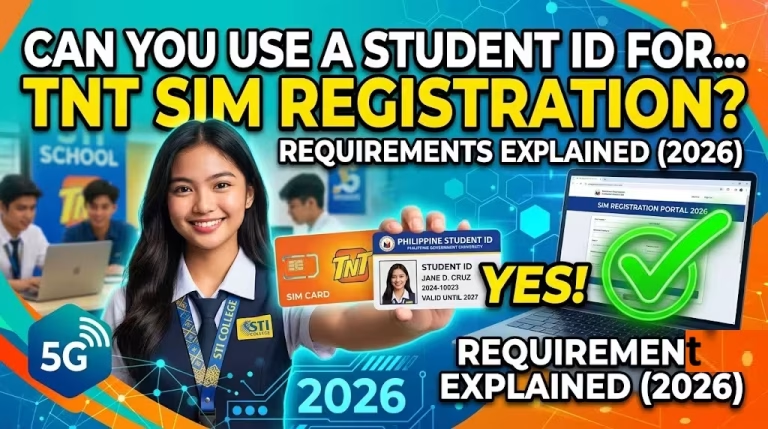
A Student ID may be accepted for minors or students in certain situations, usually when accompanied by additional supporting documents or when registration is completed by a parent or legal guardian.
Barangay Certification
If additional identity verification is needed, a Barangay Certification may be accepted in certain circumstances, especially when supported by other identification documents. Acceptance depends on DITO’s current registration guidelines.
Other Government-Issued IDs
DITO may also accept other valid government-issued IDs recognized by Philippine authorities. These documents should include the holder’s full name, photograph, signature (where applicable), and sufficient identifying information to verify the subscriber’s identity.
Before starting the registration process, always ensure that your chosen ID is valid, undamaged, and clearly legible. Using accurate information and high-quality document images helps avoid delays or rejection during verification.
How to Register a DITO SIM
Registering your DITO SIM is a simple process that only takes a few minutes if you have your valid ID and personal information ready. DITO provides multiple registration options to make the process convenient for all subscribers. Whether you have a newly purchased SIM card or you’re registering an existing one, you can complete the registration online without visiting a physical store.
Below are the different methods you can use to register your DITO SIM.
Register via DITO SIM Registration Portal
The DITO SIM Registration Portal is the official website where subscribers can register their SIM cards securely. It is the most convenient option for users who prefer completing the process through a web browser on a computer, tablet, or smartphone.
To register through the portal:
Below is the QR code you can use and register your dito sim via Website online
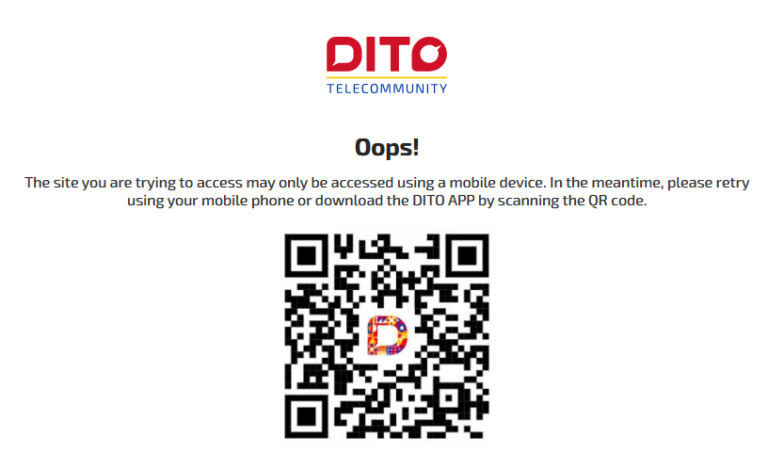
Always use the official DITO registration website to protect your personal information and avoid phishing websites.
Register Through the DITO App
If you already use the DITO App, you can register your SIM without opening a separate website. The app provides a user-friendly interface that guides you through each step of the registration process.
After installing the latest version of the app:
- Log in using your DITO mobile number.
- Open the SIM Registration section.
- Enter the required personal details.
- Upload your valid ID.
- Complete any identity verification requested by the app.
- Submit your registration.
Step by step Image screenshots for Register Through the DITO App
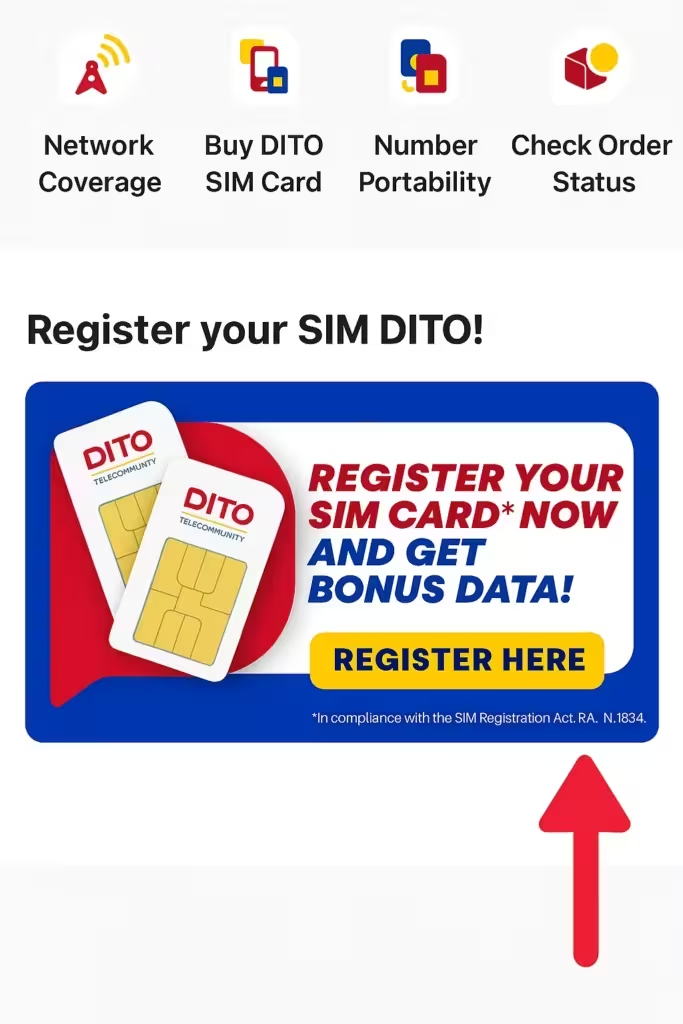
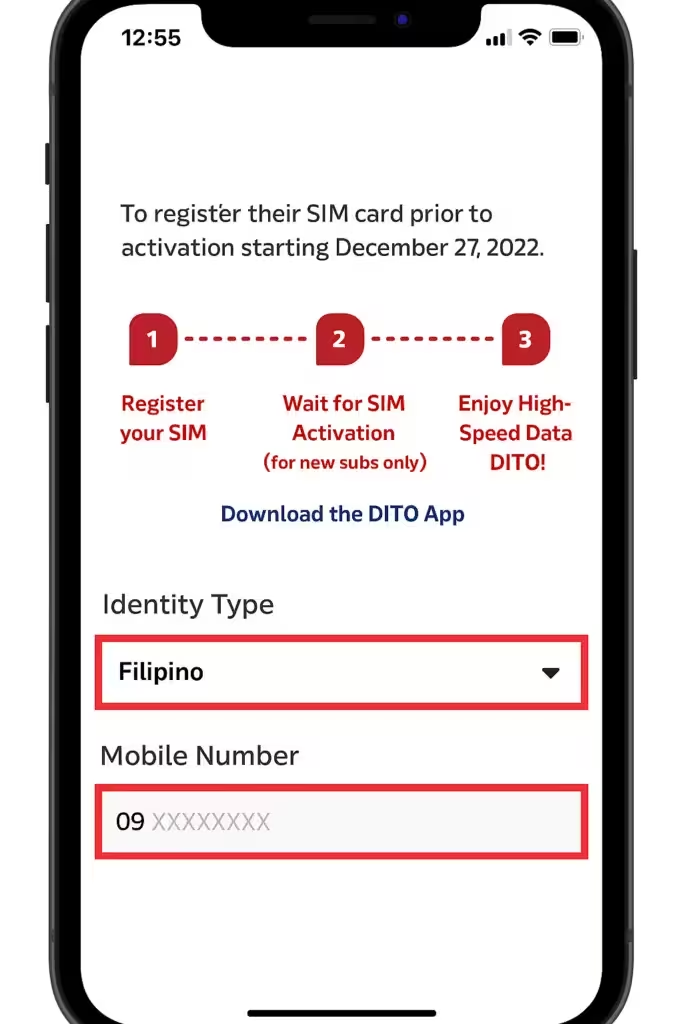
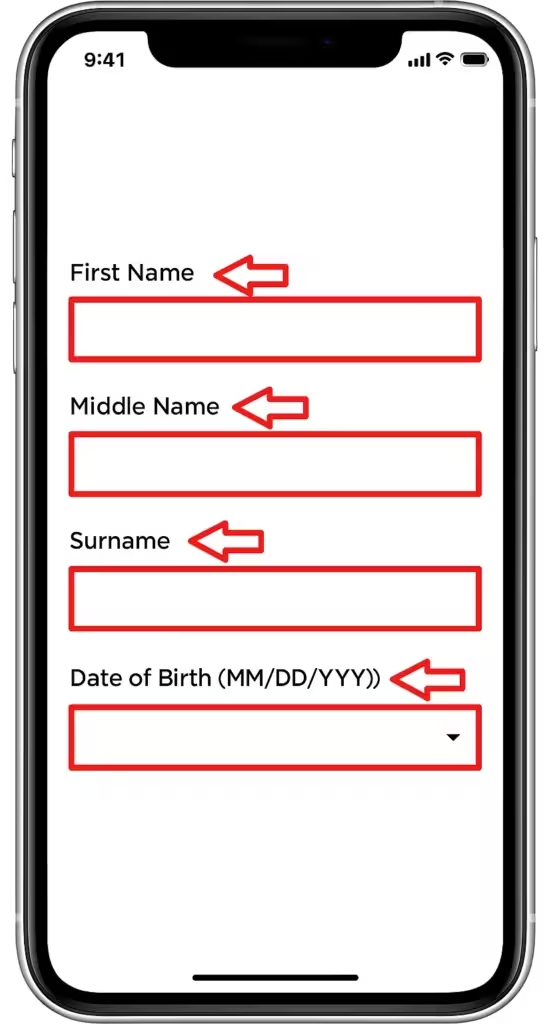
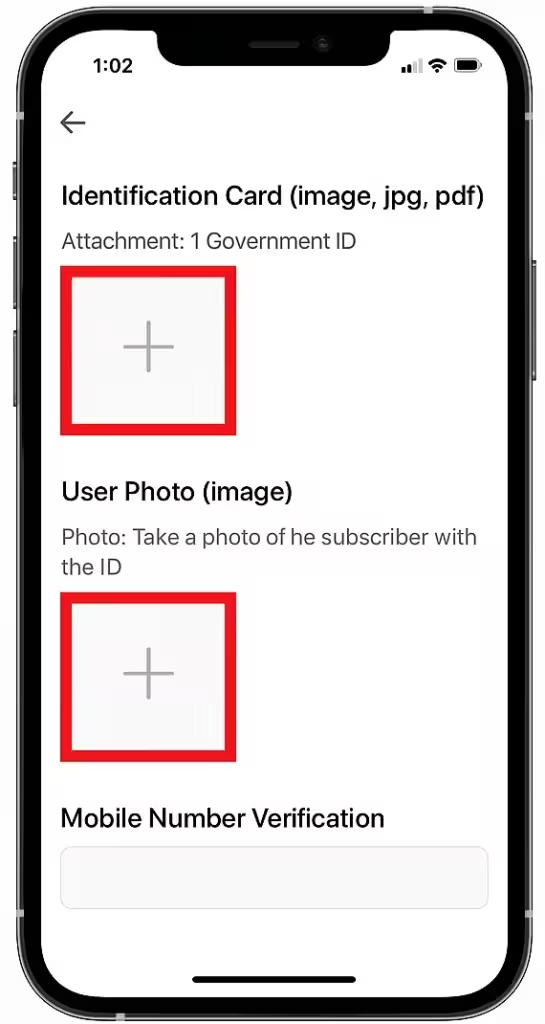
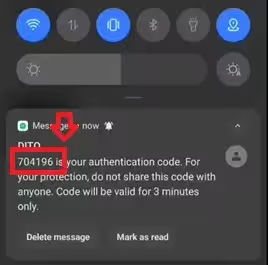
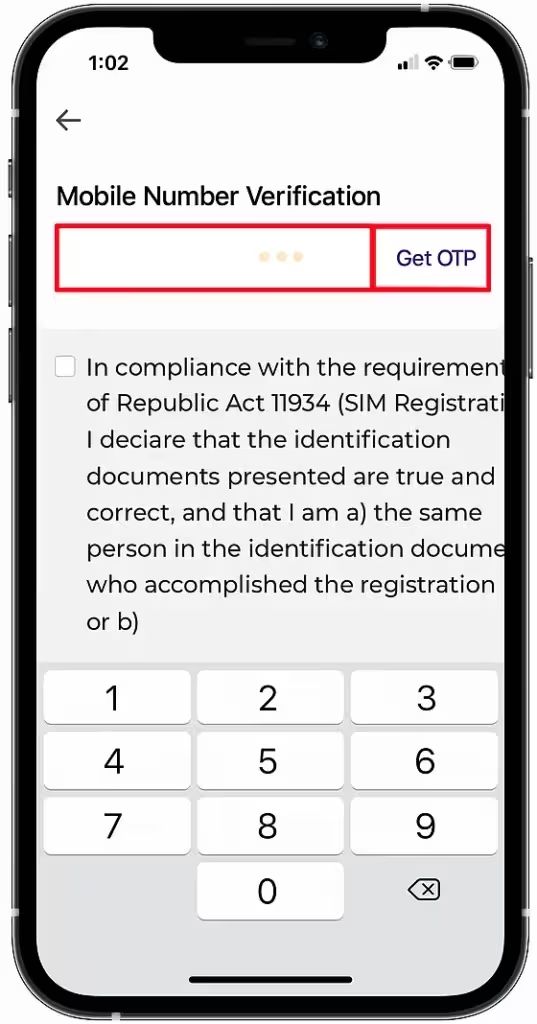
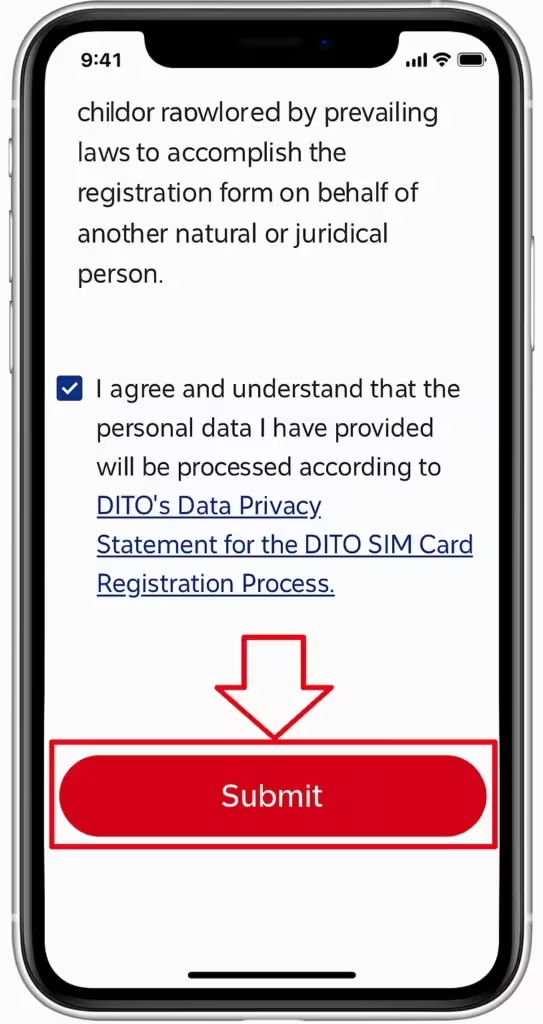
Once your application is processed, you’ll receive a notification confirming the registration status.
Register Using the SMS Registration Link
DITO may send eligible subscribers an official SMS containing a registration link. This option is designed to make registration quicker for users who have not yet completed the process.
If you receive a text message from DITO:
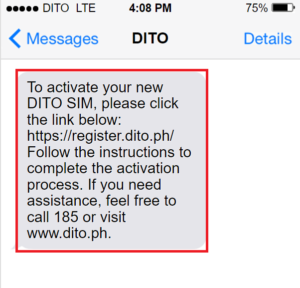
Before clicking any link, verify that the message genuinely comes from DITO to avoid online scams and fraudulent websites.
Register a New DITO SIM
Newly purchased DITO SIM cards must be registered before they can be activated and used. Registration is required by Philippine law and is part of the SIM activation process.
For a new SIM:
- Insert the SIM card into your phone.
- Access the official DITO registration portal or the DITO App.
- Verify your mobile number using the OTP.
- Complete the registration form.
- Upload a valid ID.
- Submit your application.
Once your registration is approved, your SIM will be activated, allowing you to make calls, send text messages, and access mobile data.
Register an Existing DITO SIM
Existing DITO subscribers are also required to ensure that their SIM cards are properly registered. If your SIM has not yet been registered or if DITO requests an update to your information, you should complete the registration as soon as possible.
The process is similar to registering a new SIM:
- Access the official registration portal or DITO App.
- Verify your mobile number.
- Confirm or update your personal details.
- Upload the required identification document if requested.
- Submit the registration.
Completing the registration before the announced deadline helps prevent service interruptions or SIM deactivation.
Activate Your DITO SIM After Registration
After successfully submitting your registration, DITO will review the information you provided. If everything is complete and accurate, your SIM will be activated or remain active without interruption.
In most cases, activation is completed shortly after verification. However, processing times may vary depending on the volume of registrations and whether additional verification is required.
Once your SIM is activated, you can immediately enjoy DITO’s mobile services, including voice calls, text messaging, mobile data, and other available features.
If your registration is rejected, carefully review the reason provided by DITO, correct any incorrect information, upload clearer copies of your documents if necessary, and submit your application again.
Step-by-Step DITO SIM Registration Guide
Registering your DITO SIM is a straightforward process that can usually be completed in just a few minutes. Before you begin, make sure you have your DITO SIM card, a valid government-issued ID, and a stable internet connection. Having these ready will help you finish the registration without unnecessary delays.
Follow the steps below to complete your DITO SIM registration successfully.
Step 1: Insert Your DITO SIM
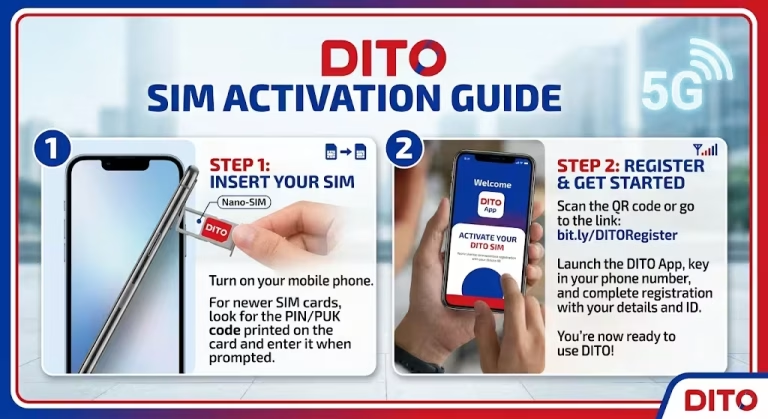
Start by inserting your DITO SIM card into your mobile phone. If you are registering a new SIM, ensure it is properly placed in the SIM tray and that your device recognizes it. Restart your phone if necessary so the network can detect the SIM.
Once the SIM is active on your device, you can proceed with the registration using the official DITO registration portal or the DITO App.
Step 2: Enter Your Mobile Number
Open the official DITO SIM Registration Portal or launch the DITO App and enter your DITO mobile number in the registration field.
Double-check the number before continuing. Entering the wrong mobile number may prevent you from receiving the verification code needed to complete the registration.
Step 3: Verify Using OTP
After entering your mobile number, DITO will send a One-Time Password (OTP) via SMS. This code confirms that you have access to the SIM card being registered.
Enter the OTP exactly as received. Since the code is only valid for a limited time, it’s best to enter it immediately. If the OTP expires or doesn’t arrive, you can request a new one through the registration page.
Step 4: Upload Your Valid ID
The next step is to upload a clear image of a valid government-issued ID. Make sure the photo is sharp, well-lit, and that all details are easy to read.
Your name and other personal information entered during registration should exactly match the information shown on your ID. Any mismatch may delay the verification process or cause your application to be rejected.
Step 5: Complete Face Verification (If Required)
Some users may be asked to complete facial verification for additional security. This usually involves taking a live selfie using your phone’s camera.
Ensure you are in a well-lit area and remove anything that may cover your face, such as sunglasses or masks. Follow the on-screen instructions carefully until the verification is completed successfully.
Step 6: Submit Your Registration
Before submitting your application, review all the information you have entered. Check your name, date of birth, address, and uploaded documents for accuracy.
If everything is correct, submit your registration. Once submitted, you may not be able to edit certain details until the verification process is complete, so it’s important to review everything carefully.
Step 7: Receive Registration Confirmation
After submitting your registration, DITO will process your application and verify the information you provided. Once your registration has been approved, you will receive a confirmation message through SMS, email, or the DITO App.
Keep this confirmation for your records. After successful registration, your DITO SIM will remain active, allowing you to continue using calls, text messaging, mobile data, and other available DITO services without interruption.
DITO SIM Registration Portal
The DITO SIM Registration Portal is the official online platform where subscribers can register their SIM cards, update registration details when permitted, and complete identity verification. The portal is designed to make the registration process simple and accessible from any device with an internet connection.
Whether you’re activating a new SIM or registering an existing one, using the official portal helps ensure that your personal information is submitted securely.
Official DITO Registration Website
DITO provides an official SIM registration website where subscribers can complete the registration process online. The portal is available 24/7 and can be accessed using a smartphone, tablet, or computer.
To protect your personal information, always use the official DITO website. Avoid registering through links shared on social media or unofficial websites, as they may be fraudulent.
How to Access the Registration Portal
Accessing the DITO registration portal is quick and straightforward.
Simply open your preferred web browser and visit the official DITO SIM registration page. Once there, enter your DITO mobile number, verify it using the One-Time Password (OTP), and follow the on-screen instructions to complete your registration.
A stable internet connection and a valid government-issued ID will help ensure a smooth registration experience.
Features of the DITO Registration Portal
The DITO registration portal includes several useful features designed to simplify the registration process.
Some of its key features include:
- Secure SIM registration
- OTP verification
- Personal information submission
- ID upload and identity verification
- Registration confirmation
- Mobile-friendly interface
- Secure data protection during submission
These features allow subscribers to complete the registration process without visiting a physical service center.
Common Portal Errors and Fixes
While the registration portal generally works smoothly, some users may encounter occasional issues.
Common problems include:
- OTP not received: Wait a few minutes and request a new code.
- Website loading slowly: Refresh the page or try using another browser.
- ID upload failed: Compress the file or upload a clearer image that meets the size requirements.
- Session expired: Log in again and continue the registration process.
- Invalid information error: Double-check that your personal details exactly match your government-issued ID.
If the issue continues, contacting DITO customer support is the best option.
DITO App SIM Registration
The DITO App offers another convenient way to register your SIM card. Instead of using a web browser, subscribers can complete the entire registration process directly from their mobile devices.
The app is especially useful because it also allows users to manage their accounts, monitor data usage, purchase promos, and access customer support.
Download the DITO App
The DITO App is available for both Android and iPhone users.
Download the application from the Google Play Store or the Apple App Store, then install the latest version before starting the registration process.
Using the latest version helps prevent compatibility issues and ensures access to the newest features.
Create or Log In to Your Account
After opening the app, sign in using your existing DITO account. If you are a new subscriber, create an account using your DITO mobile number and verify it through the OTP sent via SMS.
Once logged in, you can access the SIM registration section from the app’s main menu.
Register Your SIM Using the App
To register your SIM through the app:
- Open the DITO App.
- Sign in to your account.
- Select the SIM Registration option.
- Enter your personal information.
- Upload your valid ID.
- Complete facial verification if requested.
- Review your information and submit the application.
You’ll receive a notification once your registration has been processed successfully.
Benefits of Using the DITO App
Using the DITO App provides several advantages beyond SIM registration.
Some of the benefits include:
- Register your SIM anytime.
- Manage your mobile account in one place.
- Monitor data balance and usage.
- Purchase promos and load.
- Receive important account notifications.
- Access customer support quickly.
Because everything is available in one application, many subscribers find it more convenient than using a web browser.
DITO SIM Registration via SMS
Some DITO subscribers receive an official SMS containing a registration link. This method provides a faster way to access the registration page without manually searching for the official website.
The registration process itself remains the same after opening the link.
How the SMS Registration Link Works
When DITO sends an official registration message, it contains a secure link that directs you to the registration portal.
After opening the link:
- Verify your mobile number.
- Enter your personal information.
- Upload your identification document.
- Submit your registration.
Always confirm that the SMS comes from an official DITO sender before opening any links.
What to Do If You Don’t Receive the SMS
If you haven’t received the registration message:
- Wait a few minutes.
- Check your network signal.
- Restart your phone.
- Ensure your SIM is properly inserted.
If the SMS still doesn’t arrive, you can manually visit the official DITO registration portal or use the DITO App to complete the registration.
Request a New Registration Link
If your registration link has expired or you accidentally deleted the message, simply access the official DITO registration portal and begin the process manually.
If needed, DITO customer support can also assist you with obtaining a new registration link or resolving registration issues.
How to Check DITO SIM Registration Status
After submitting your application, it’s a good idea to verify whether your SIM has been successfully registered. DITO offers several ways to check your registration status.
Verify Registration Online
Visit the official DITO registration portal and log in using your DITO mobile number.
Depending on the available services, the portal may display whether your registration is pending, approved, or requires additional verification.
Check Through the DITO App
The DITO App is one of the easiest ways to check your registration status.
Simply sign in to your account and navigate to the SIM registration or account information section. If your registration has been approved, the status will usually be displayed within the app.
Contact DITO Customer Support
If you’re unable to confirm your registration online, contact DITO Customer Support.
Be prepared to provide your mobile number and other account details so the support representative can verify your registration status and assist with any issues.
Registration Status FAQs
How long does registration verification take?
Most registrations are processed shortly after submission, although some applications may require additional review.
Can I use my SIM while registration is pending?
This depends on DITO’s current registration policies and the status of your application.
What if my registration is rejected?
Review the reason for rejection, correct any inaccurate information, upload clearer documents if necessary, and submit your application again.
DITO SIM Activation
After your registration has been successfully verified, your DITO SIM will be activated for regular use. Activation allows you to access voice calls, text messaging, mobile data, and other available DITO services.
How Long Activation Takes
In many cases, activation occurs shortly after your registration has been approved. However, processing times can vary depending on system activity and whether additional verification is required.
If activation takes longer than expected, wait for the official confirmation message before attempting another registration.
How to Know If Your SIM Is Active
You can usually tell that your SIM has been activated when:
- You can make and receive phone calls.
- SMS messages are working normally.
- Mobile data connects successfully.
- You receive a confirmation message from DITO.
- The DITO App shows your account as active.
If all these services are working, your SIM has likely been activated successfully.
Activation Issues and Solutions
If your SIM isn’t active after registration, try the following steps:
- Restart your phone.
- Reinsert the SIM card.
- Check whether your registration has been approved.
- Ensure your phone supports DITO’s network.
- Update your phone’s network settings if necessary.
If the problem continues, contact DITO Customer Support for further assistance. They can verify your registration and determine whether any additional action is required before activation is completed.
DITO SIM Registration for Foreigners
Foreign nationals staying in the Philippines can register a DITO SIM card, provided they meet the requirements set under the SIM Registration Act. The registration process is similar to that for Filipino citizens, but additional documents may be required to verify the applicant’s identity and immigration status.
Whether you are a tourist, a temporary visitor, or a long-term resident, make sure all the information you submit is accurate and matches your official documents.
Required Documents
Foreign applicants must prepare valid identification and travel documents before starting the registration process. While the exact requirements may vary depending on immigration status, the following documents are commonly requested:
- Valid passport
- Valid visa or immigration document (if applicable)
- Proof of local address, when required
- Return or onward travel ticket for tourists
- Other supporting documents requested by DITO or Philippine authorities
Having clear copies of these documents helps avoid delays during verification.
Visa Requirements
Visa requirements depend on the type of stay in the Philippines.
Tourists are generally required to present a valid passport and proof of their temporary stay. Foreign residents, students, workers, and other long-term visitors may also need to provide a valid visa, Alien Certificate of Registration (ACR), or other immigration documents issued by the appropriate Philippine authorities.
Always ensure that your visa or immigration documents are still valid at the time of registration.
Passport Verification
A valid passport is one of the primary identification documents accepted for foreign subscribers. During registration, you will need to upload a clear image of the passport’s information page.
The details entered in the registration form—including your full name, nationality, passport number, and date of birth—should exactly match the information shown in your passport. Any discrepancies may result in delayed approval or registration failure.
Tourist SIM Registration Rules
Tourists visiting the Philippines may purchase and register a DITO prepaid SIM card for use during their stay. Registration usually requires a valid passport, proof of travel, and other supporting documents requested under the current regulations.
Since tourist SIMs are intended for temporary use, subscribers should follow all registration requirements and keep their travel documents available if additional verification is needed.
DITO SIM Registration for Businesses
Businesses, corporations, government offices, and other organizations can register DITO SIM cards under the company’s name. Corporate registration helps organizations manage employee mobile services while remaining compliant with the SIM Registration Act.
The registration is typically completed by an authorized company representative.
Corporate Registration Requirements
Companies registering DITO SIM cards must submit both business documents and identification for the person completing the registration.
Typical requirements include:
- Business registration documents
- Valid government-issued ID of the authorized representative
- Company contact details
- Authorization letter or board resolution, when applicable
- Additional documents requested during verification
Providing complete and accurate information helps speed up the approval process.
SEC and DTI Documents
Businesses are generally required to submit proof of legal registration.
Depending on the type of organization, this may include:
- Certificate of Registration from the Securities and Exchange Commission (SEC) for corporations
- Department of Trade and Industry (DTI) Certificate for sole proprietorships
- Other business registration documents, if applicable
These documents confirm that the organization is legally registered to operate in the Philippines.
Authorized Representative Requirements
Corporate SIM registration must be completed by a person authorized to act on behalf of the company.
The representative should provide:
- A valid government-issued ID
- An authorization letter or board resolution, if required
- Accurate company information
- Any additional documents requested during the verification process
The representative is responsible for ensuring that all submitted information is correct and complete.
Common DITO SIM Registration Problems
Although the registration process is generally straightforward, subscribers may occasionally experience technical issues or verification errors. Most problems can be resolved by checking the submitted information, improving document quality, or trying the registration again.
Below are some of the most common registration issues and their possible causes.
OTP Not Received
If you don’t receive the One-Time Password (OTP), first make sure your DITO SIM has a network signal and can receive text messages.
You can also try:
- Waiting a few minutes.
- Requesting a new OTP.
- Restarting your phone.
- Reinserting your SIM card.
If the problem continues, contact DITO Customer Support for assistance.
Invalid ID Error
An invalid ID error usually appears when the uploaded identification document cannot be verified.
This may happen if:
- The ID has expired.
- The uploaded image is blurry.
- Important information is cut off.
- The submitted details do not match the ID.
Upload a clear, valid ID and carefully review all personal information before submitting the registration again.
Photo Upload Failed
Photo upload issues are often caused by poor internet connectivity or unsupported file formats.
To resolve the problem:
- Use a stable internet connection.
- Take a clear photo in good lighting.
- Ensure the file size meets the portal’s requirements.
- Try uploading the image again using another browser or device.
Face Verification Failed
Facial verification may fail if the camera cannot clearly recognize your face.
For better results:
- Remove sunglasses, hats, or face coverings.
- Stand in a well-lit area.
- Hold your phone steady.
- Follow the on-screen instructions carefully.
If the issue persists, restart the app or repeat the verification later.
Registration Failed
A registration failure can occur for several reasons, including incomplete information, verification issues, or temporary system errors.
Before submitting another application:
- Check that all fields are completed correctly.
- Confirm your ID is valid.
- Upload clearer images if needed.
- Ensure your internet connection is stable.
If your registration continues to fail, contact DITO Customer Support for further assistance.
SIM Already Registered
This message indicates that the mobile number has already been successfully registered.
If you believe the registration was completed by someone else or you suspect unauthorized use of your SIM, contact DITO immediately to verify your account and protect your personal information.
Incorrect Personal Information
Even small spelling mistakes can cause verification problems.
Always review your:
- Full name
- Date of birth
- Address
- ID number
- Nationality
The information entered during registration must exactly match your government-issued ID.
Website Not Loading
If the registration portal doesn’t load properly:
- Refresh the page.
- Clear your browser’s cache and cookies.
- Try another browser.
- Switch to a different internet connection.
- Visit the portal again after a few minutes if the server is busy.
Temporary website issues are usually resolved quickly.
DITO App Not Working
If the DITO App isn’t functioning properly, try the following troubleshooting steps:
- Update the app to the latest version.
- Restart your device.
- Clear the app’s cache (if available on your device).
- Close and reopen the application.
- Reinstall the app if necessary.
If the problem remains unresolved, use the official registration portal or contact DITO Customer Support for assistance.
How to Fix DITO SIM Registration Errors
Most DITO SIM registration issues can be resolved with a few simple troubleshooting steps. Problems such as OTP delays, failed uploads, or app errors are often caused by temporary technical issues rather than problems with your SIM. Before contacting customer support, try the solutions below to complete your registration successfully.
Clear Browser Cache
If you’re registering through the DITO SIM Registration Portal and the website isn’t working properly, clearing your browser’s cache and cookies may help.
Stored browser data can sometimes interfere with how websites load or function. After clearing the cache, close your browser, reopen it, and visit the official DITO registration page again. If the issue persists, try using a different browser or device.
Update the DITO App
Using an outdated version of the DITO App may cause registration errors or prevent certain features from working correctly.
Open the Google Play Store or Apple App Store and check for available updates. Installing the latest version ensures you have the newest security improvements, bug fixes, and compatibility updates before attempting to register again.
Restart Your Device
A simple device restart can often fix temporary software or network issues that affect the registration process.
Turn your phone off completely, wait a few seconds, and then power it back on. After restarting, reconnect to the internet and try completing the registration once more.
Use a Stable Internet Connection
A weak or unstable internet connection can interrupt OTP verification, prevent photo uploads, or cause the registration page to stop responding.
For the best experience, connect to a reliable Wi-Fi network or ensure you have a strong mobile data signal before starting the registration process. Avoid switching between networks while your application is being submitted.
Contact Customer Support
If you’ve tried all the troubleshooting steps and still can’t complete your registration, contact DITO Customer Support.
Provide your DITO mobile number and explain the issue you’re experiencing. If possible, include screenshots of any error messages. This information helps the support team identify the problem and provide the appropriate solution.
DITO SIM Registration Deadline
SIM registration deadlines are determined by the Philippine government and implemented by telecommunications providers such as DITO. While the nationwide registration period required under the original implementation of the SIM Registration Act has already ended, new DITO SIM cards must still be registered before they can be activated, and subscribers should always follow any updated instructions issued by DITO or the relevant government agencies.
Current Registration Policy
Under the current policy, every new DITO SIM card must be registered before it can be activated for use. Subscribers are required to provide accurate personal information and complete identity verification during the registration process.
If future registration requirements or regulatory changes are announced, DITO will publish updates through its official website, mobile app, and customer support channels.
What Happens If You Miss the Deadline
When a registration deadline applies, failing to complete the required registration may result in the SIM becoming unavailable for regular use. An unregistered SIM cannot be used for calls, text messages, or mobile data once it has been deactivated under applicable rules.
To avoid service interruptions, it’s always best to complete the registration as soon as possible after purchasing a new DITO SIM.
SIM Deactivation Rules
A SIM that is not registered within the applicable registration period may be deactivated in accordance with Philippine regulations.
Once deactivated, the SIM can no longer access DITO’s mobile services until reactivation is allowed under the applicable rules or policies. Registration requirements may differ depending on future government directives.
SIM Reactivation Process
If your SIM has been deactivated and is still eligible for reactivation, you may be asked to complete the registration or verification process before service can be restored.
The exact procedure depends on DITO’s current policy and regulatory requirements. If you’re unsure whether your SIM can still be reactivated, contact DITO Customer Support for guidance.
DITO SIM Registration Rewards
From time to time, DITO offers promotional rewards to encourage subscribers to register and activate their SIM cards. These offers are promotional in nature and may change or end without prior notice. Always check DITO’s official website or app for the latest promotions before registering.
Free Bonus Data
DITO has previously offered bonus mobile data to eligible subscribers who successfully completed SIM registration and activation within the promotional period. The amount of bonus data and the eligibility requirements may vary depending on the current campaign.
Welcome Offers
New DITO subscribers may also qualify for welcome promotions that include mobile data, call and text benefits, or discounted starter packs after activating their SIM.
Since promotional offers change periodically, review the terms and conditions to confirm eligibility before relying on any specific reward.
Loyalty Rewards
Existing DITO subscribers may receive exclusive rewards through ongoing promotional campaigns, seasonal offers, or app-based activities.
These loyalty benefits are separate from SIM registration and are typically announced through the DITO App or official communication channels.
Promo Eligibility After Registration
Successfully registering your SIM does not automatically guarantee promotional rewards. Eligibility depends on the specific terms of each promotion, including activation dates, registration period, and other qualifying conditions.
Before expecting any bonus, read the promotion details carefully to understand who qualifies, what benefits are included, and when they will be credited to your account.
DITO SIM Registration Security
SIM registration is more than just a legal requirement—it also helps create a safer mobile experience for subscribers. By linking every active SIM card to a verified identity, DITO and government authorities can better discourage the misuse of mobile services for illegal activities. At the same time, subscribers benefit from improved account security and easier identity verification when requesting account-related services.
Although no system can eliminate all forms of fraud, registering your SIM adds an important layer of protection for both users and the telecommunications network.
Why SIM Registration Protects Users
Registering your DITO SIM helps ensure that your mobile number is associated with your verified identity. This makes it more difficult for criminals to use anonymous SIM cards for scams, phishing attacks, and other unlawful activities.
A registered SIM can also make it easier to recover your mobile account if your SIM card is lost, damaged, or stolen. Since your identity has already been verified, customer support can process certain account requests more efficiently after confirming ownership.
Preventing SIM Fraud
Fraudsters often rely on unverified or illegally obtained SIM cards to send scam messages, impersonate legitimate organizations, or commit financial fraud. SIM registration helps reduce these risks by requiring subscribers to verify their identities before using mobile services.
While registration cannot completely prevent fraud, it makes anonymous misuse of SIM cards more difficult and supports efforts to investigate suspicious activities when necessary.
Subscribers should also remain cautious by avoiding unknown links, protecting one-time passwords (OTPs), and never sharing personal account information with unverified individuals.
Data Privacy During Registration
During the registration process, DITO collects personal information required by law, such as your name, date of birth, address, and identification details. This information is used to verify your identity and maintain subscriber records in accordance with applicable regulations.
The collected data is handled according to relevant Philippine privacy laws and should only be used for legitimate registration, verification, and legal compliance purposes. Subscribers are encouraged to review DITO’s Privacy Policy to understand how their personal information is collected, stored, and processed.
Keeping Your Personal Information Safe
Although DITO implements security measures during registration, subscribers also play an important role in protecting their own information.
To keep your personal details secure:
- Register only through the official DITO website or mobile app.
- Never share your OTP with anyone.
- Avoid clicking registration links from unknown sources.
- Use a secure internet connection when uploading documents.
- Keep your phone and DITO account protected with strong passwords or device security features.
- Report suspicious messages or possible scams to DITO immediately.
Following these simple practices can significantly reduce the risk of identity theft and unauthorized access to your mobile account.
DITO Customer Support
If you experience problems during SIM registration or need help managing your DITO account, several customer support options are available. Whether you prefer speaking with a representative, chatting online, or visiting a service center, you can choose the method that’s most convenient for you.
Before contacting support, keep your DITO mobile number and any relevant registration details ready to help speed up the verification process.
DITO Hotline
The DITO Customer Care Hotline is one of the quickest ways to get assistance with registration issues, SIM activation, account verification, billing concerns, and other mobile services.
When calling, be prepared to verify your identity by providing your registered mobile number and other account information requested by the support representative.
For the latest hotline numbers and operating hours, refer to DITO’s official website or the DITO App.
Live Chat Support
DITO also offers live chat support through its official digital channels. This option is ideal for subscribers who prefer messaging instead of making a phone call.
Live chat representatives can assist with common concerns such as:
- SIM registration issues
- Registration status
- Activation concerns
- Mobile data and promo inquiries
- Basic troubleshooting
Response times may vary depending on the volume of customer inquiries.
Email Support
If your concern requires detailed explanations or supporting documents, you can contact DITO through its official customer support email.
Email support is useful for submitting screenshots, verification documents, or reporting technical issues that may require further investigation. When sending an email, include your registered mobile number, a clear description of the issue, and any relevant attachments to help the support team assist you more efficiently.
Always use the official email address published by DITO to avoid phishing or fraudulent communications.
Visit a DITO Experience Store
Subscribers who prefer in-person assistance can visit a DITO Experience Store. Customer service representatives at these locations can help with SIM registration, account verification, SIM replacement, postpaid inquiries, and other supported services.
Bring a valid government-issued ID and any documents related to your concern, as these may be needed for identity verification before assistance can be provided.
Before visiting, it’s a good idea to check the store’s operating hours and the services available at your chosen location.
Help Through the DITO App
The DITO App is more than just a tool for SIM registration—it also provides convenient access to account management and customer support.
Through the app, you can:
- Check your account information.
- Monitor your mobile data usage.
- Purchase load and promos.
- View registration details.
- Access self-help resources.
- Connect with customer support for assistance.
Using the app allows many common issues to be resolved without needing to call or visit a physical service center, making it one of the most convenient support options for DITO subscribers.
DITO SIM Registration FAQs
Below are answers to some of the most frequently asked questions about DITO SIM registration. These FAQs cover the registration process, eligibility, troubleshooting, and other common concerns to help subscribers complete their registration with confidence.
DITO SIM Registration Tips
Registering your DITO SIM is a straightforward process, but paying attention to a few important details can help you avoid delays, verification issues, or registration failures. Whether you’re registering a new SIM or updating an existing one, following these practical tips will make the process faster and more secure.
Register Early to Avoid Service Interruptions
Don’t wait until the last minute to register your DITO SIM. Completing the registration as soon as possible gives you enough time to resolve any unexpected issues, such as OTP delays, document verification problems, or technical errors.
Early registration also helps ensure uninterrupted access to calls, text messages, and mobile data. If additional information or document verification is required, you’ll have enough time to complete the process without worrying about possible service disruptions.
Use a Clear Photo of Your ID
One of the most common reasons for registration delays is uploading a poor-quality ID image. Before submitting your application, make sure your ID is photographed in a well-lit area and that all text and personal details are clearly visible.
Avoid blurry images, reflections, shadows, or cropped photos that hide important information. Place your ID on a flat surface and capture the entire document without editing or applying filters. A clear, high-quality image helps the verification process move more quickly.
Ensure Your Personal Details Match Your ID
Always enter your personal information exactly as it appears on your government-issued ID. Even minor differences in your name, birth date, or other details can lead to verification errors or a rejected application.
Before submitting your registration, carefully review every field to make sure the information matches your identification document. Taking a few extra moments to double-check your details can save you time and prevent unnecessary delays.
Keep Your Reference Number Safe
After submitting your registration, you may receive a confirmation or reference number. Keep this number in a safe place, as it can be useful if you need to check your registration status or contact DITO Customer Support about your application.
Consider saving the confirmation message, taking a screenshot, or writing the reference number down so you can easily access it later if needed.
Update Your Information When Necessary
If your personal details change after registration—such as your name or other important information—check DITO’s current policies to determine whether an update is required.
Keeping your registered information accurate helps ensure that your account remains secure and makes future requests, such as SIM replacement or account verification, much easier. Whenever you’re unsure about updating your information, contact DITO Customer Support for guidance.
Related Guides
- DITO SIM Activation Guide
- DITO APN Settings
- DITO Data Promos
- DITO eSIM Guide
- DITO SIM Replacement
- DITO Number Portability
- DITO Roaming Services
- DITO Customer Care Guide
- Globe SIM Registration
- Smart SIM Registration
- TNT SIM Registration
- GOMO SIM Registration
Conclusion
Completing your DITO SIM registration is an important step toward complying with Philippine regulations while ensuring uninterrupted access to DITO’s mobile services. Whether you’re a new subscriber, an existing customer, a business owner, or a foreign visitor, registering your SIM helps verify your identity and contributes to a safer and more secure mobile network.
By preparing the required documents, providing accurate information, and following the official registration process, you can complete your registration quickly and avoid unnecessary delays.
Key Takeaways About DITO SIM Registration
DITO SIM registration is mandatory for all eligible subscribers under the SIM Registration Act in the Philippines. The process can be completed online through the official DITO SIM Registration Portal or the DITO App, making it convenient for both prepaid and postpaid users.
Before starting your registration, make sure you have a valid government-issued ID and a stable internet connection. Carefully review your personal information before submitting your application, as incorrect or incomplete details may delay verification. If you encounter any issues during registration, DITO Customer Support and its official help channels are available to assist you.
Final Registration Checklist
Before submitting your DITO SIM registration, confirm that you have completed the following:
- Your DITO SIM card is inserted and ready for registration.
- You have a valid government-issued ID or other accepted identification document.
- Your personal information matches the details shown on your ID.
- Your ID photo is clear, complete, and easy to read.
- You have access to your mobile number to receive the OTP.
- You have completed face verification if prompted.
- You reviewed all the information before submitting your application.
- You saved your registration confirmation or reference number for future reference.
Completing this checklist can help reduce the chances of registration errors and speed up the verification process.
Stay Connected With DITO Securely
Registering your DITO SIM not only keeps you compliant with Philippine law but also helps protect your mobile number from unauthorized use. After successful registration, continue to safeguard your account by keeping your personal information up to date, protecting your OTPs, and using only DITO’s official website and mobile app for account-related services.
For the latest registration updates, accepted documents, promotional offers, or support information, always refer to DITO’s official communication channels. Staying informed and following recommended security practices will help you enjoy reliable, secure, and uninterrupted mobile services with DITO.