
How to Register a TNT SIM for Minors: Parent or Guardian Requirements (2026)
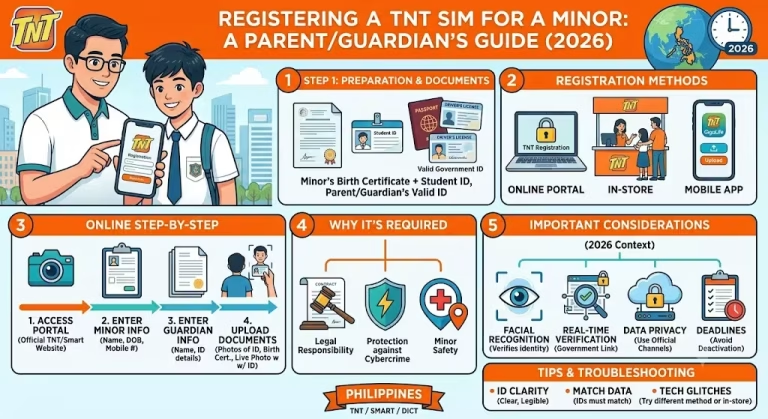
If you’re wondering how to register a TNT SIM for a minor, the process is straightforward. Since minors cannot register a SIM under their own name, the registration must be completed by the child’s parent or legal guardian using the guardian’s personal information and a valid government-issued ID. Try here: Tnt Sim Registration
This guide explains the eligibility requirements, documents needed, step-by-step registration process, common mistakes to avoid, and answers to frequently asked questions to help you complete the registration successfully.
Related – How to Share Data on TNT & Prepaid Promos 2026
Quick Answer
A TNT SIM for a minor must be registered under the full name and details of the minor’s parent or legal guardian. The adult must complete the registration through the Smart SIM Registration Portal, provide a valid government-issued ID, complete selfie verification, and submit the registration form.
Who Can Register a TNT SIM for a Minor?
A TNT SIM owned or used by a minor cannot be registered using the child’s personal information alone.
Instead, the registration must be completed by:
- A parent
- A court-appointed legal guardian
The responsible adult becomes the official registered subscriber of the SIM.
Requirements Before You Begin
Prepare the following before starting the registration:
- TNT SIM card inserted in your phone
- Active mobile signal to receive the OTP
- Parent or legal guardian’s valid government-issued ID
- Smartphone or computer with internet access
- Camera for selfie verification
Having these ready helps you complete the process without interruptions.
Explore: latest TNT promos
How to Register a TNT SIM for a Minor
Follow these simple steps to register the SIM successfully.
Step 1: Open the Smart SIM Registration Portal
Visit the official Smart SIM Registration Portal using your mobile phone or computer.
Always use the official registration website to protect your personal information.
Step 2: Enter the TNT Mobile Number
Type the TNT mobile number you want to register.
Double-check the number before proceeding.
Step 3: Verify Using the OTP
A One-Time PIN (OTP) will be sent via SMS.
Enter the OTP on the registration page within the required time.
Step 4: Fill Out the Registration Form
Complete the form using the parent or legal guardian’s information, including:
- Full legal name
- Date of birth
- Nationality
- Residential address
- Other requested identification details
Do not use the minor’s information in place of the parent or guardian.
Step 5: Upload a Valid Government ID
Upload a clear photo of the parent or guardian’s government-issued identification.
Ensure:
- The image is sharp
- All details are readable
- The entire ID is visible
Blurry photos may delay approval.
Step 6: Complete Selfie Verification
Take a live selfie when prompted.
For best results:
- Face the camera directly.
- Remove sunglasses or hats.
- Ensure good lighting.
- Keep your face fully visible.
Step 7: Accept the Terms and Submit
Review the information carefully.
Accept the terms and conditions before submitting the registration.
Step 8: Save the Confirmation Number
After successful submission, you’ll receive an SMS confirmation containing a control number.
Save or screenshot this number for future reference.
Other Guides: How to Share Load (Pasaload) on TNT
Documents Accepted for Registration
The parent or legal guardian should use a valid government-issued identification accepted by the Smart registration system.
Examples may include:
- National ID
- Passport
- Driver’s License
- Unified Multi-Purpose ID (UMID)
- Other officially accepted government IDs
Check the official Smart registration portal for the latest list of accepted identification documents.
Common Registration Mistakes to Avoid
Many registration issues happen because of simple errors.
Avoid these common mistakes:
- Using the minor’s details instead of the parent’s information
- Entering an incorrect mobile number
- Uploading blurry ID photos
- Taking a poor-quality selfie
- Letting the OTP expire
- Forgetting to save the confirmation control number
Review every detail before submitting the form.
Read more: Giga 99 TNT Video Promo Code
What Happens After Registration?
Once your registration is submitted:
- The information is reviewed.
- Verification is completed.
- The registration is processed according to applicable requirements.
- You’ll receive confirmation once the registration is successful.
Keep your confirmation message for your records.
Helpful Tips for a Smooth Registration
- Use a stable internet connection.
- Register in a well-lit area for better selfie verification.
- Keep your ID clean and readable.
- Enter information exactly as it appears on the ID.
- Complete the process in one session if possible.
When Should You Contact Smart Customer Support?
Consider contacting Smart customer support if:
- You do not receive the OTP.
- Selfie verification repeatedly fails.
- Your registration cannot be submitted.
- Your confirmation SMS does not arrive.
- You accidentally entered incorrect information.
The official Smart support channels can assist with account-specific concerns.
Final Thoughts
Registering a TNT SIM for a minor is a simple process when the parent or legal guardian completes the registration using their own personal information. By preparing the required documents, following the registration steps carefully, and saving the confirmation control number, you can complete the process smoothly and avoid common delays.
If you’re registering multiple family SIM cards, complete each registration individually using the appropriate subscriber information.